}Create Sketchy Shadows from your SketchUp Models.
Keywords:
Sketchy Shadows is a feature of SpaceDesign, which creates shadows using sketchy edges or
Sketchy Patterns
from your SketchUp drawing.
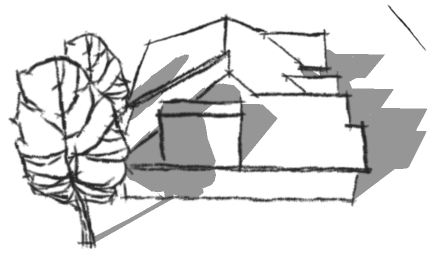
Here is an example of a model with Sketchy Edges, but normal SketchUp shadows,
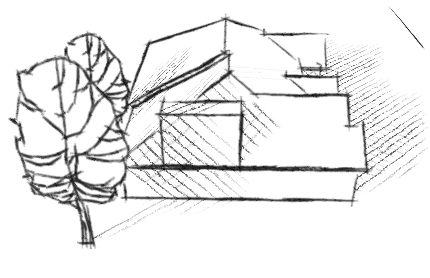
and the same model with Sketchy Shadows:
SketchUp model - with harsh SketchUp shadows
Same Model with soft, cross-hatched, Sketchy Shadows
Step by Step
Download and Install SpaceDesign from Render Plus - which includesSketchy Shadows
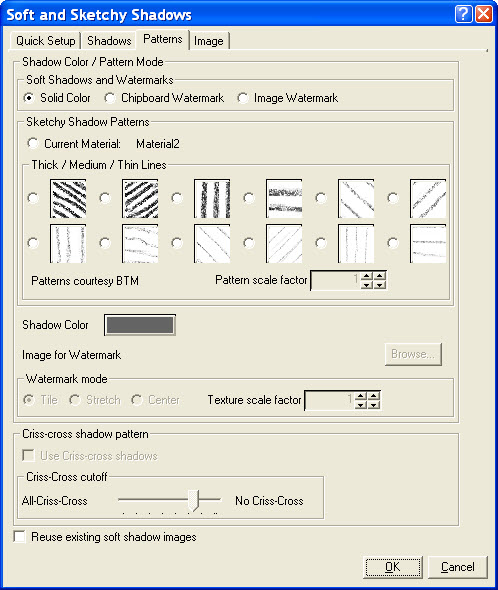
Load the Soft and sketchy Shadows dialog using the Sketchy Shadows icon(
).
Select the Patterns tab.
Select one of the line patterns.
Check Launch when complete on the Image tab..
Click OK to create Sketchy Shadows
Read below more more settings and examples.
Soft and Sketchy Shadows menu in SpaceDesign
Notes:
The Sketchy Shadows are created as a .JPG file and loaded into your .JPG viewer. (If you don't select Launch when complete, you can find the final image in My Documents\NprTools\NprTools_Images)
You can adjust options like Line scale factor and Darkness to fine tune the final image. (See Settings below)

 ).
).