
Section Planes
| |||||
You can use SketchUp Section Planes to cut sections enabling you to view geometry within your model.
What Section Planes means to you...
- Allows for better access to the interior of a model.
- IRender nXt is able to use all section planes when rendered.
- When rendered with IRender nXt, correct illumination calculations are processed which means the room will render accurately.
Section Plane Settings
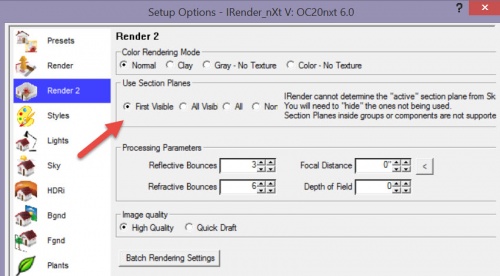
IRender nXt cannot tell which section planes are enabled or disabled. Ordinarily, only the first section plane which is visible is used to clip the rendering.
This can be changed on the IRender 2 Tab to allow processing of all section planes and processing of hidden section planes.
Note: SketchUp only supports 1 active Section Plane at the main model level. IRender nXt can support multiple section planes.
Note: Section Planes in groups or components are not supported.
Advantages of section planes
See entire room with using a wide angle lens

Option 1 often produces a distorted image.
Especially if you want to see detail on the left and right walls.
Remove geometry which blocks the view without altering the scene
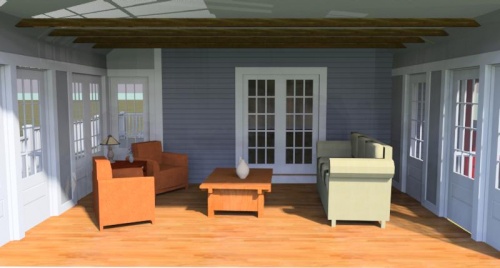
Removing geometry is a problem for photorealistic renderers.
Especially if there is sun and sky lighting to be processed through windows, because you have effectively removed an entire wall which means that light from the outside is now able to filter in causing improper illumination.
Section Planes provide the best result
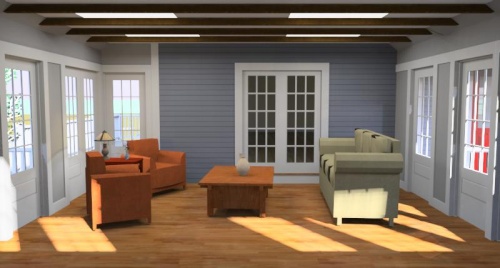
You get the best of both worlds. The wall is removed, allowing for better camera positioning, but the wall is still used for shadows, illumination and reflection which means the room will be lit accurately.