Panoramic Views
| |||||

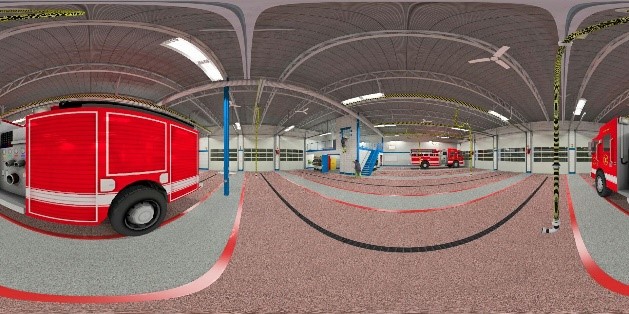
When presenting a project to a client you often use several rendered images. Another option is to create an interactive, 360 degree panoramic view. This can then be turned into a movie, or embedded with a compatible viewer in a web page.
You can create Panoramic Views in IRender nXt by clicking the Make Panoramic View check box on the Render Setup Tab dialog.
A panoramic image is created by rotating the camera while rendering to create a full 360 x 360 degree image. It works best with large interiors, or with exteriors which have a central point which let you view the full model.
As most software used to process Panoramic Views requires that the aspect ratio be 2:1 (e.g. 2000 x 1000) pixels, the rendering resolution is automatically set to a ratio of 2 to 1.

Panorama Examples - Using IRender nXt
Utility Bay Panorama (Courtesy of Mitchell Associates Architects)
View the flash movie made from this panoramic image: Click here to see in viewer

Apparatus Bay Panorama (Courtesy of Mitchell Associates Architects)
View the flash movie made from this panoramic image: Click here to see in viewer