
How to Download and Install
Contents
Download and Installation
Step 1: Download
| Download from Site | |
| Point your Internet browser to renderplus.com and CLICK "Downloads".
Or click on this URL: Downloads Page |

click on either the ‘Try it’, ‘Buy it’ or on the ‘Downloads’ tab. |
| Fill out Form | |
|
Fill out the form and Download a Render Plus Software plugin.
|

click ‘Download’ |
| Select a plugin | |
|
Click ‘Download’ for the appropriate plugin. The download will start immediately, the file will be added to your "Downloads" folder. If you know the downloads location on your computer, skip to Step 3. |

Select tje product to download.
|
If you know the downloads location on your computer skip to Step 3
Step 2: Find the downloaded file
Windows 8, 8.1, 10 or newer:
- Downloads are typically found in: This PC > Downloads
Windows 7 or older:
- Internet Explorer: Typically C:\...[user name]\My Documents\Downloads
- Firefox: Type Ctrl+J or Choose Firefox > Tools > Options. In the General tab, look in the Downloads area. Check the setting Save Files To to see the download location
- Google Chrome: Type Ctrl+J or Choose Customize and Control Google Chrome>Options. In the Under The Hood tab, look under the Downloads heading.
OS X (MAC)
- Firefox: Type COMMAND+J or Choose Firefox > Preferences. In the General tab, look in the Downloads area. Check the setting Save Files To to see the download location
- Safari: Type Option+Command+L or Choose Safari > Preferences. In the General tab, check the setting Save Downloaded Files To.
- Google Chrome: Type Command+J or Choose Customize and Control Google Chrome>Options. In the Under The Hood tab, look under the Downloads heading. Check the Download location setting.
Step 3: Extract .zip contents
| Extract file | |
| Right-click on the IRender .zip folder and select Extract All | 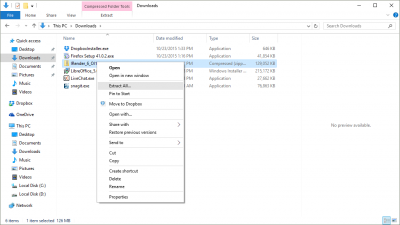
click on ‘Extract All”.
|
| Complete Extraction | |
| Check Show extracted files when complete, then click Extract | 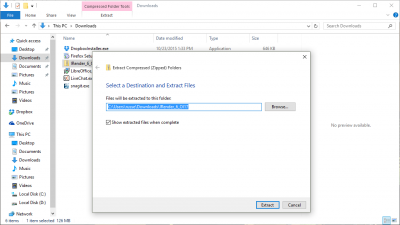
check Show extracted files... |
Step 4: Install the Software
| Right-Click | |
| Right-Click on the .exe. Then select Run as Administrator | 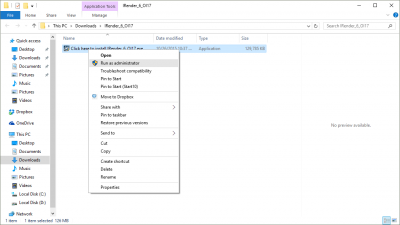
Select Run as Administrator.
|
| Follow Steps to Install | |
| Follow the steps to install the software on your computer. | 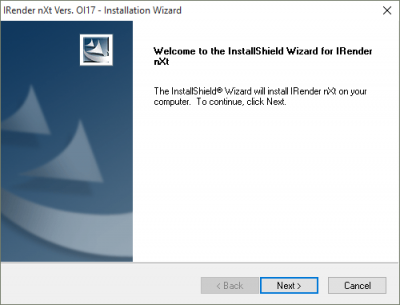
Install software.
|
| Select SketchUp Version | |
| If you have more than one version of SketchUp installed on your computer, make sure that you select the correct version for the Extension you are adding. | 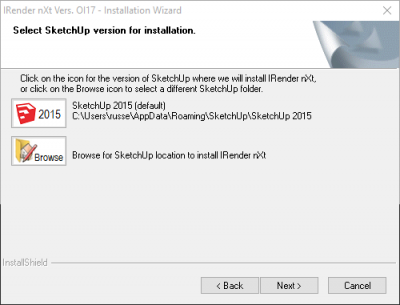
SketchUp Version |
Step 5: Start SketchUp
| Start Product from Plugins Tab | |
|
Open SketchUp. After you download and install the software, you are ready to use it. Most products will automatically load into SketchUp. If the product does not appear, check to see if it is available on the Extensions Tab. If it does not appear, check the SketchUp Preferences/Extensions Wizard. See: Enabling SketchUp Extensions Also, check that the Toolbar is enabled under View/Toolbars. If you don’t still don't see the product, reinstall it.
|
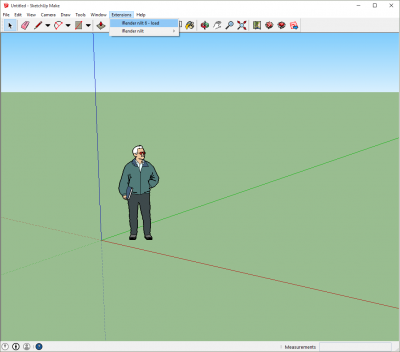
click on ‘Extensions’ to load toolbar.
|
| Toolbar Loaded | |
| Once the toolbar is loaded, you can start using the software. | 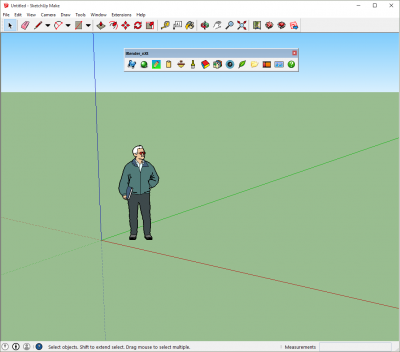
Start using your new software! |
Problems?
If you encounter problems installing the software, here are some tips:
When more than one version of SketchUp is installed
| 'Extensions' does not appear in SketchUp | |
| Extensions is not added to the SketchUp menu bar until an Extension has been installed. If you installed a SketchUp Extension but Extensions is not an option on the menu bar, the most likely cause is that the installed software is not associated with the version of SketchUp that you are running. Reinstall the extension and select the appropriate version of SketchUp. | |
| Select a SketchUp Version | |
| If more than one version of SketchUp is installed on your computer, it is important to select the SketchUp version that you intend to use with the Extension.
You can use an Extension with more than one version of SketchUp. To add the extension to another installed version of SketchUp, install the software again and select a different SketchUp version. You can repeat this process for as many versions of SketchUp as you have installed. |
SketchUp Version |
| Didn't select the right SketchUp version? | |
| No need to panic! Install the Extension again and this time select the the version of SketchUp that you will use with the Extension you are installing. Remember that you can use the extension with more than one version of SketchUp. | |
The software installed, but there is no toolbar
| Load the toolbar from SketchUp Extensions | |
| Click Extensions, then the Extension that you intend to use. |
click on ‘Extensions’ to load toolbar. |
| Make sure the toolbar is enabled | |
| Click View, then Toolbars. Make sure that the toolbar is checked. | 
SketchUp Version |
| Run MS redist | |
| Start File Explorer and browse to this folder on your computer: Program Files (x86)\Render Plus Systems\IRender_nXt\redist
You should find 5 executable files (.exe). Double-Click each .exe file. When you are finished and if there were no errors, restart SketchUp. The toolbar should load. |
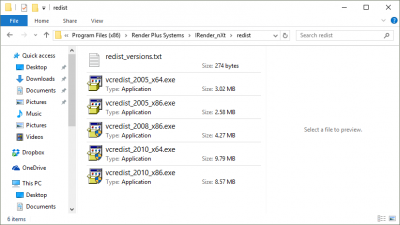
SketchUp Version |
| Contact us - we're here to help! | |
| Feel free to contact us: Render Plus Support Email, we're here to help. When you contact us by email, please provide as much information as you can so that we can get your software up and running quickly. | |